Usage
Dashboard widget
- Open the Dashboard module.
- Choose Add widget.
- Select TYPO3 Support Status.
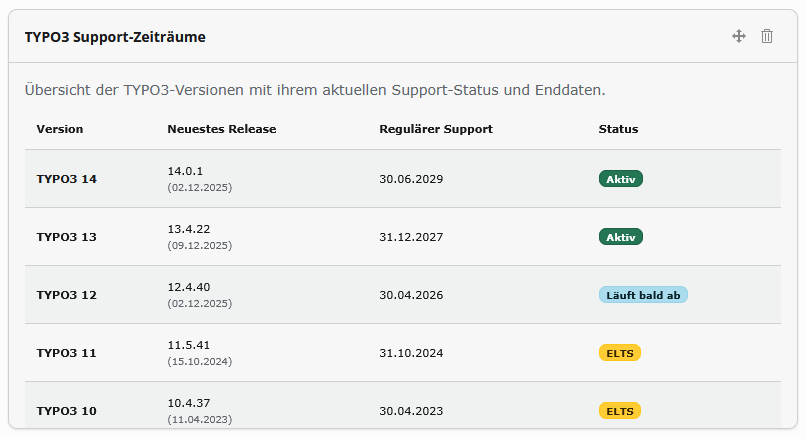
The widget lists every configured major version with a colour-coded badge — active, expiring, ELTS or expired — and scrolls through the older releases.
Frontend roadmap
- Create a content element and choose Plugins → TYPO3 Support Times.
- On the Plugin tab, pick the versions to display and, if needed, the chart height (see Configuration).
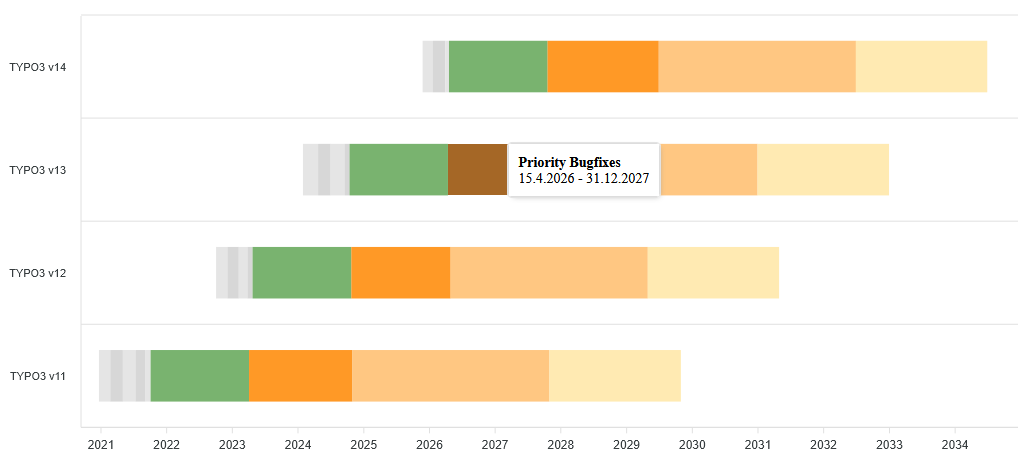
- Save and open the page — the interactive timeline renders with ApexCharts.
Each version is drawn with its phases: the grey sprint releases before an LTS, green regular maintenance, orange priority/security support, the lighter ELTS band and the extended partner support. Future TYPO3 releases appear with their estimated dates until the official data replaces them.
Outdated-version warning
Nothing to configure. In the backend, the system-information toolbar (top right, next to the TYPO3 version) shows a warning badge when a newer patch release exists for your branch. The message links to the release notes on get.typo3.org. If the TYPO3 API cannot be reached, the warning is skipped silently.