TYPO3 Support Times
Show the TYPO3 support timeline where editors and integrators actually look: in the backend dashboard, on a public page, and next to the version number in the toolbar. The data comes from the official TYPO3 sources and is cached, so the timeline stays current without a manual step.
What the extension does
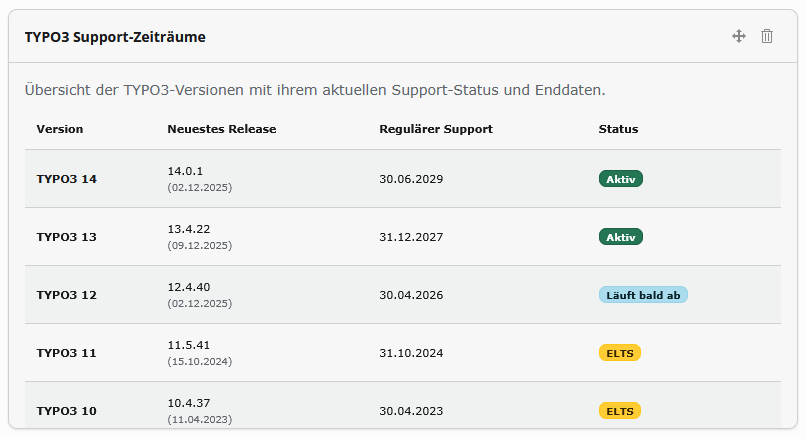
Dashboard widget — a "TYPO3 Support Status" widget listing every major version with a colour-coded badge: active, expiring, ELTS or expired. The table scrolls through the older releases as well.
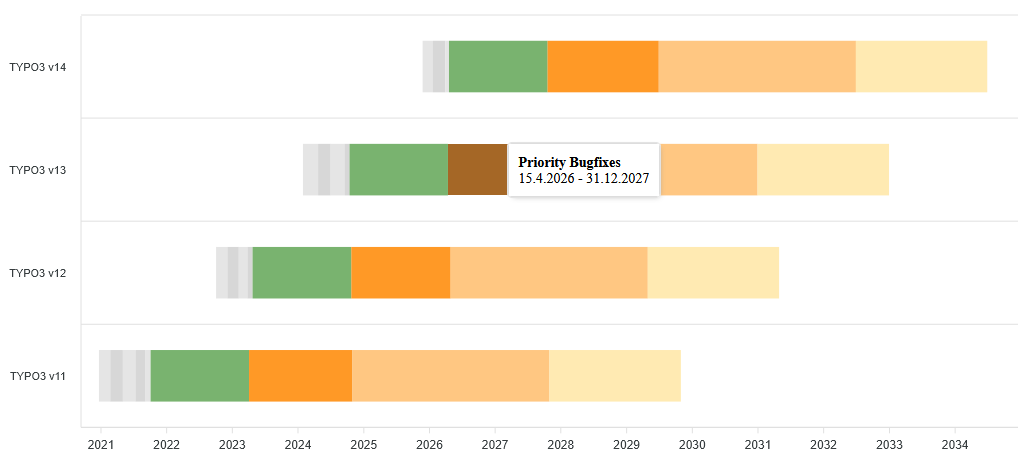
Frontend roadmap — an interactive timeline (ApexCharts, loaded locally, no CDN) that draws each version's phases: sprint releases, regular maintenance, priority/security support, ELTS and extended partner support. Height and the set of versions shown are configured per plugin.
Outdated-version warning — the system-information toolbar compares the installed version against the latest patch of its branch and shows a warning, linking straight to the release notes on get.typo3.org. If the TYPO3 API is unreachable, it stays silent rather than failing.
Where to go next
- Installation — Composer, static template, requirements.
- Configuration — extension settings and the plugin FlexForm.
- Usage — adding the widget, the roadmap plugin and reading the warning.
- Developer Guide — data source, caching and the APIs used.
- Changelog — what changed in each version.