Editorial guide
This guide is for editors. It explains what to fill in on the AI transparency tab — not how to interpret the AI Act. When in doubt, the person responsible in your organisation decides, not the extension.
Where to find the tab
Media → select a file → Edit metadata → tab AI transparency.
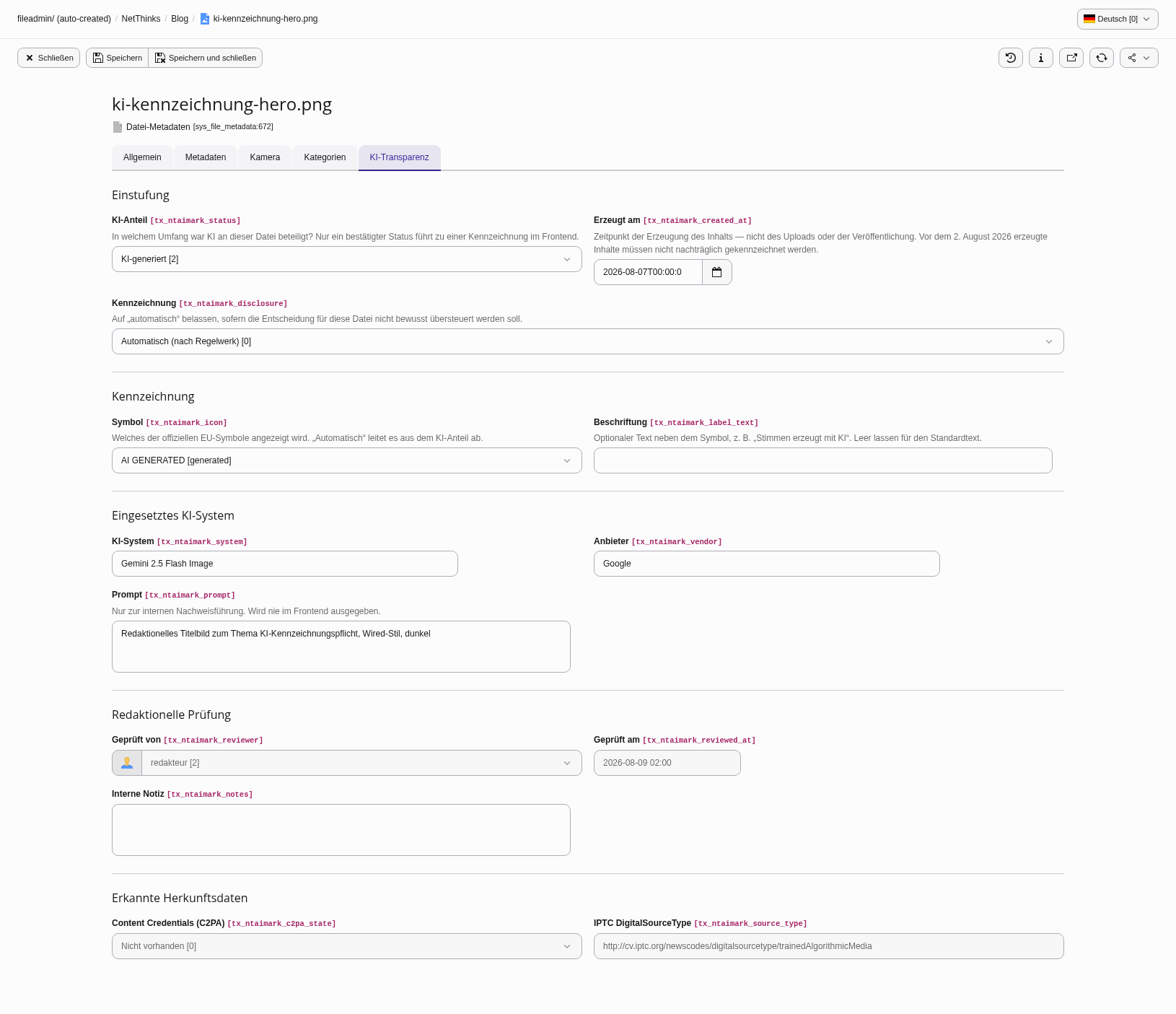
For texts the same tab appears on pages and content elements.
The essentials in three sentences
- AI involvement is the only field you have to set — everything else follows from it.
- Labelling stays on "Automatic" unless you deliberately want to override the decision.
- Fields you cannot see are not relevant to your case. They appear after saving, once the AI involvement calls for them.
The "AI transparency" module
Content → AI transparency. The module answers two questions: how far the review has come, and what is up next.
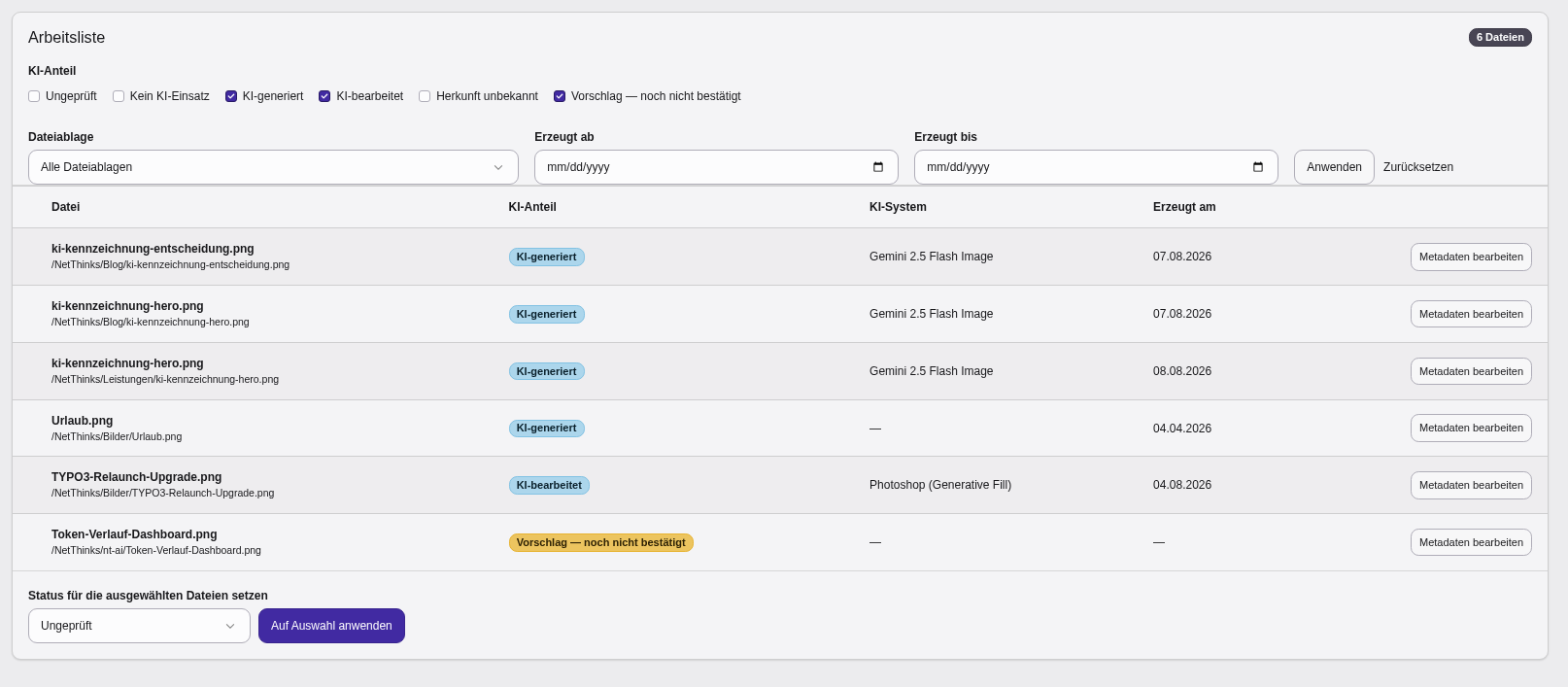
The work list can be filtered by AI involvement, storage and creation period. Several files can be classified at once — each one gets its own trail entry.
A suggestion comes from automatic detection and is not yet a finding: it produces no label in the frontend and waits for you to confirm it.
The fields for media
AI involvement
| Choice | When |
|---|---|
| Not reviewed | Starting state. Nobody has looked at the file. Nothing is labelled. |
| No AI involved | A photo, graphic or illustration without generative AI. |
| AI generated | Produced entirely by an AI; the human part was the prompt. |
| AI modified | Mixed in either direction: an AI image reworked, or a real photo altered with AI. |
| Origin unknown | Stock material where it can no longer be established how it came about. |
| Suggestion — not confirmed | Set by automatic detection. Confirm it or correct it — while it says "Suggestion", nothing is labelled. |
A suggestion is not a finding
Saying "this content is AI generated" is a claim about the content, and a person makes it, not the software.
Created on
The moment the content was created — not the upload, and not the publication.
This drives the cutoff rule: content created before 2 August 2026 does not have to be labelled retroactively. Leave the field empty if you do not know the date — an empty field deliberately does not create an exemption, since an unknown date would otherwise quietly excuse the file.
Labelling
| Choice | Effect |
|---|---|
| Automatic | The rules decide. The normal case. |
| Always label | Label even where the rules would not require it. |
| Do not label | You have assessed the case and consider a label unnecessary. |
"Always label" overrides neither the cutoff, nor "No AI involved", nor an unreviewed record — it takes effect only where a label would be possible anyway.
Reason for not labelling
Appears as soon as you choose "Do not label". The entry is recorded and is your documentation of the decision.
| Reason | Means |
|---|---|
| Created before 2 August 2026 | Cutoff rule |
| Obviously unrealistic or cartoon-like | No deceptive effect |
| Artistic work / Satire / Fictional work | Reduced obligation, "in an appropriate manner" |
| Internal content only | Not publicly available |
| Assistive editing without substantial change | Spell checking, for instance |
| Other | Please explain in the internal note |
Icon and label text
Appear as soon as a label could result.
- Icon: "Automatic" derives it from the AI involvement and is usually right. "No icon" is a deliberate choice for a text-only label — it is respected and not overruled.
- Label text: optional wording next to the icon, e.g. "Voices generated with AI". Leave empty for the default.
AI system, vendor, prompt
Appear where AI was involved, or where there is a suggestion.
- AI system and vendor show up in the expandable detail panel in the frontend, e.g. "DALL·E 3 (OpenAI)".
- The prompt is internal documentation only. It is never rendered in the frontend.
Reviewed by / Reviewed on
Set by the extension once a status has been confirmed. You cannot edit them — that is intentional, they are evidence.
Detected provenance data
The result of the automatic inspection on upload (C2PA signature, IPTC digital source type). Information only, not editable.
The fields for texts
AI involvement in the text
No AI involved · AI draft, revised by a human · AI generated.
Matter of public interest
The obligation for texts only covers matters of public interest, not every text. Everything else stays switched off until you tick this.
Reviewed by a human, and the responsible person
Editorial review lifts the obligation — but only together with the person answering for it. A tick box with no name documents nothing, so the text keeps its notice until somebody is named. That is why the field is required as soon as the box is ticked.
Typical cases
| Situation | Entry |
|---|---|
| An ordinary stock photograph | No AI involved |
| A header image made with Midjourney, 2026 | AI generated · system "Midjourney" · creation date |
| A photo whose sky was replaced with AI | AI modified |
| A photo with only brightness and contrast corrected | No AI involved |
| A cartoon-like AI illustration with no realistic effect | AI generated · Do not label · reason "Obviously unrealistic" |
| An archive picture from 2019 | No AI involved, enter the creation date |
| Stock material whose origin cannot be established | Origin unknown |
| A press release drafted by AI and edited by the newsroom | AI draft, revised · public interest · reviewed, with a name |
What the extension does not do
- It does not detect whether a foreign image came from an AI. Heuristic detectors are unreliable, and a false positive would be a false statement about a piece of content.
- It does not make the legal assessment. It structures your decision and documents it.